Connect GitHub, define protected behavior, run differential verification, and turn agent evidence into enforceable merge decisions.
Popular:
Software should remember what it is supposed to do.
ShipCheck turns repository behavior into persistent memory. Each future change can then be evaluated against what the software has already established as important.
Discover
Find important existing behavior.
Protect
Create persistent Behavior Guards.
Verify
Evaluate future behavioral changes.
Remember
Build history across future changes.
Benchmarks & evidence
Comparison lab and published measurements
Collect real observations, compare shared historical cases, and inspect the limits behind the numbers.
Open Comparison lab from the dashboard sidebar. A study contains one target behavior per historical case, exact base/head commits, reviewed labels, tool configurations, evidence links, and recorded outcomes. Unknown costs or timings stay blank.
01Define a protocol and include regressions plus negative controls.
02Review labels using separate evidence. Keep later fixes and label tests outside detector inputs.
03Record the same cases for each tool and configuration, including memory-enabled and memory-disabled ShipCheck reviews.
04Review target matches and information boundaries, then inspect the default paired-case comparison.
05Save and export the study. Publication uses a separate reviewed dataset; private saves never publish automatically.
Measurement
Meaning
Precision
Confirmed target detections / all target violation reports
Recall
Detected regressions / all positive cases, including errors and abstentions
Usable case outcomes / attempted cases; this is not proof of runtime contract coverage
The first pilot is deliberately small
The October 28 Zod pilot covers one historical change, two regression causes and one within-change negative control. Both advisory-review variants caught one cause. It does not establish general production accuracy, memory superiority, or a competitive advantage. Competitors remain unmeasured.
The public measured-comparisons page links raw reports, source commits, separate label-validation evidence, call timing and token usage. First-party, Codex-assisted adjudication and public-model contamination remain limitations. Software test-suite pass counts are engineering checks, not detection-accuracy measurements.
What verification evidence establishes
Distinguish demonstrated scenario regressions, predictions, and missing verification.
Configure test evidence under a repository's protected behavior. Link an existing Vitest test path, an optional test-name pattern, and the exact stored claims its assertions exercise. A matching filename, retained string, or AI-generated plan does not prove behavior.
A new scenario regression requires a passing base, failing head, matching test-file digest, report identity, and an explicit claim mapping.
A failure on both revisions is pre-existing. Changed tests, empty runs, setup failures, missing reports and unsupported execution are inconclusive.
Runtime support currently targets the versioned Vitest/npm workflow. Dependencies requiring install hooks, private package credentials or external services need a supported adapter.
The workflow uses resource-limited containers, no application credentials, and disabled networking during test execution. Dependency installation still needs network access.
The public ground-truth workflow validates historical labels separately; its later assertions are never supplied to the advisory detector.
Scoped evidence, not universal proof
Passing a mapped test supports the exercised scenario and selected claims. Bad tests, incorrect mappings, nondeterminism, unsupported dependencies and incomplete source coverage remain possible. Inspect coverage and uncertainties before enforcing a merge policy.
Getting started
What is ShipCheck?
Understand how ShipCheck becomes the decision layer for software change.
ShipCheck is the decision layer for software change. It turns code, tests, history, safeguards, and team decisions into a living model of what the system is meant to do.
Traditional code review asks whether newly changed code looks correct. ShipCheck asks the larger question: does this change still belong in the system your team intended to build, and is there enough evidence to prove it?
Detect meaningful behavior changes.
Find security and authorization regressions.
Detect weakened safeguards and validation.
Identify test and regression-coverage gaps.
Discover important existing repository behavior.
Protect important behavior with Behavior Guards.
Govern protected behavior with versioned Behavior Contracts.
Execute eligible protected scenarios against both base and head revisions.
Publish risk-aware GitHub merge checks with audited exceptions.
Share repositories, contracts, policies, reports, and approvals in Team Workspaces.
Map provider contracts to consumers across APIs, SDKs, events, and data boundaries.
Require specific evidence before a behavior can be verified.
Preserve uncertainty when the available proof is incomplete.
Compare future pull requests against repository memory.
Track how behavior changes over time.
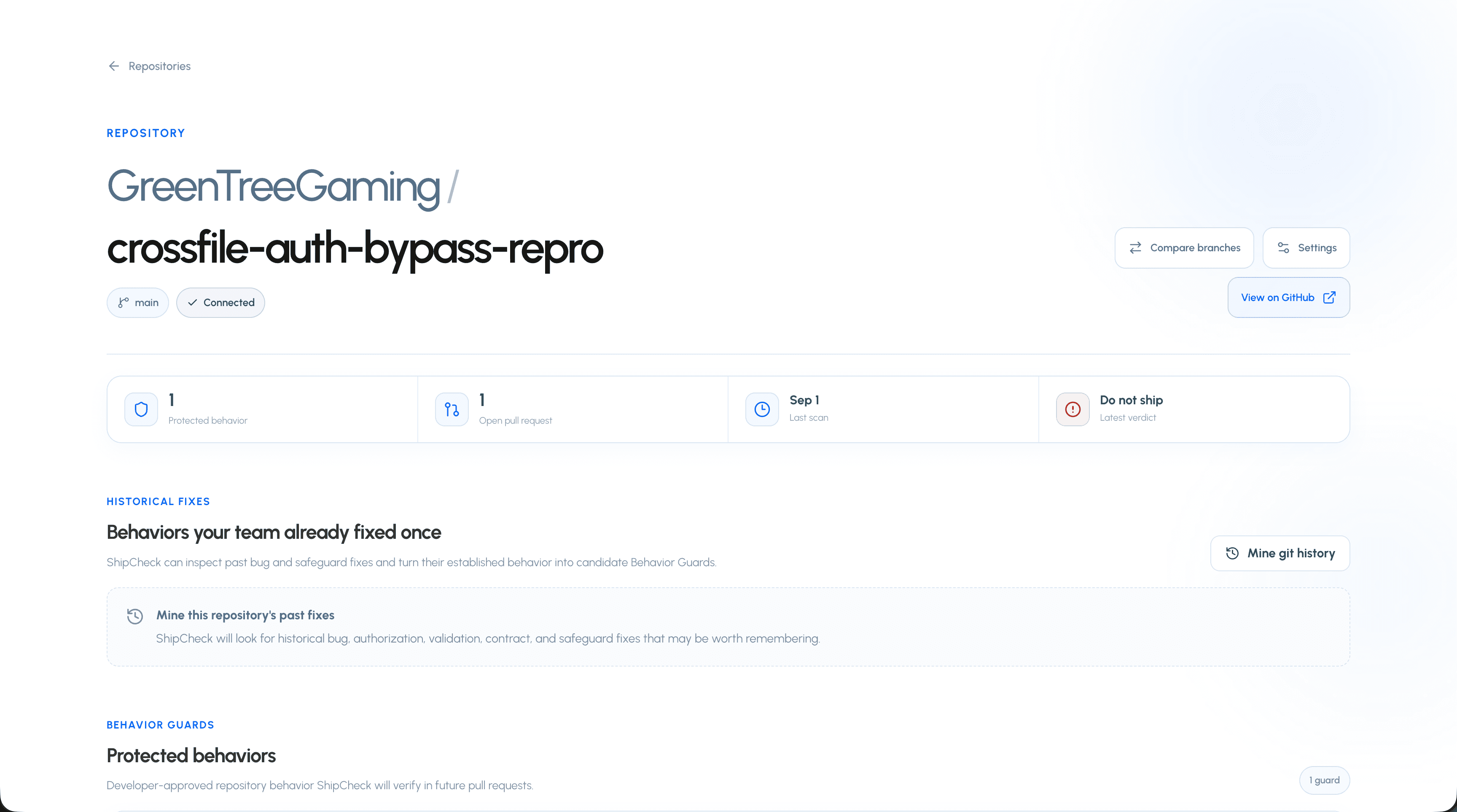
Mine Git history for important fixes worth protecting.
Generate focused fixes and regression tests.
Track findings across rescans.
Run scans directly from GitHub with the /shipcheck pull-request command.
Produce a risk-aware Ready, Review, or Do not ship verdict.
ShipCheck BETA
ShipCheck is currently in beta. Features and limits may continue to evolve while the behavioral-memory model is developed.
Connect GitHub
Install the ShipCheck GitHub App and give ShipCheck access to repositories.
ShipCheck connects through its GitHub App. The integration allows ShipCheck to discover repositories, inspect pull requests, read repository context, respond to repository events, accept the /shipcheck pull-request command, and publish scan information back into the GitHub workflow.
01Create or sign in to your ShipCheck account.
02Choose the option to connect GitHub.
03Install the ShipCheck GitHub App on your GitHub account or organization.
04Select the repositories ShipCheck should be allowed to access.
05Return to ShipCheck and synchronize your repositories.
06Activate the repositories you want ShipCheck to analyze.
Only repositories made available through the GitHub App installation can be synchronized into ShipCheck.
Repository sync
Understand how installed GitHub repositories appear inside ShipCheck.
After the GitHub App is installed, ShipCheck synchronizes repositories from that installation into the Repositories page.
Repository synchronization and ShipCheck activation are separate concepts. A repository may be visible because GitHub granted ShipCheck access while remaining inactive for scanning until you enable it.
01Open Repositories from the dashboard.
02Synchronize GitHub if a newly authorized repository is not yet shown.
03Select a repository.
04Enable ShipCheck for that repository.
05Configure repository-specific scan settings if necessary.
Run your first scan
Analyze a pull request from ShipCheck or trigger the scan directly from GitHub.
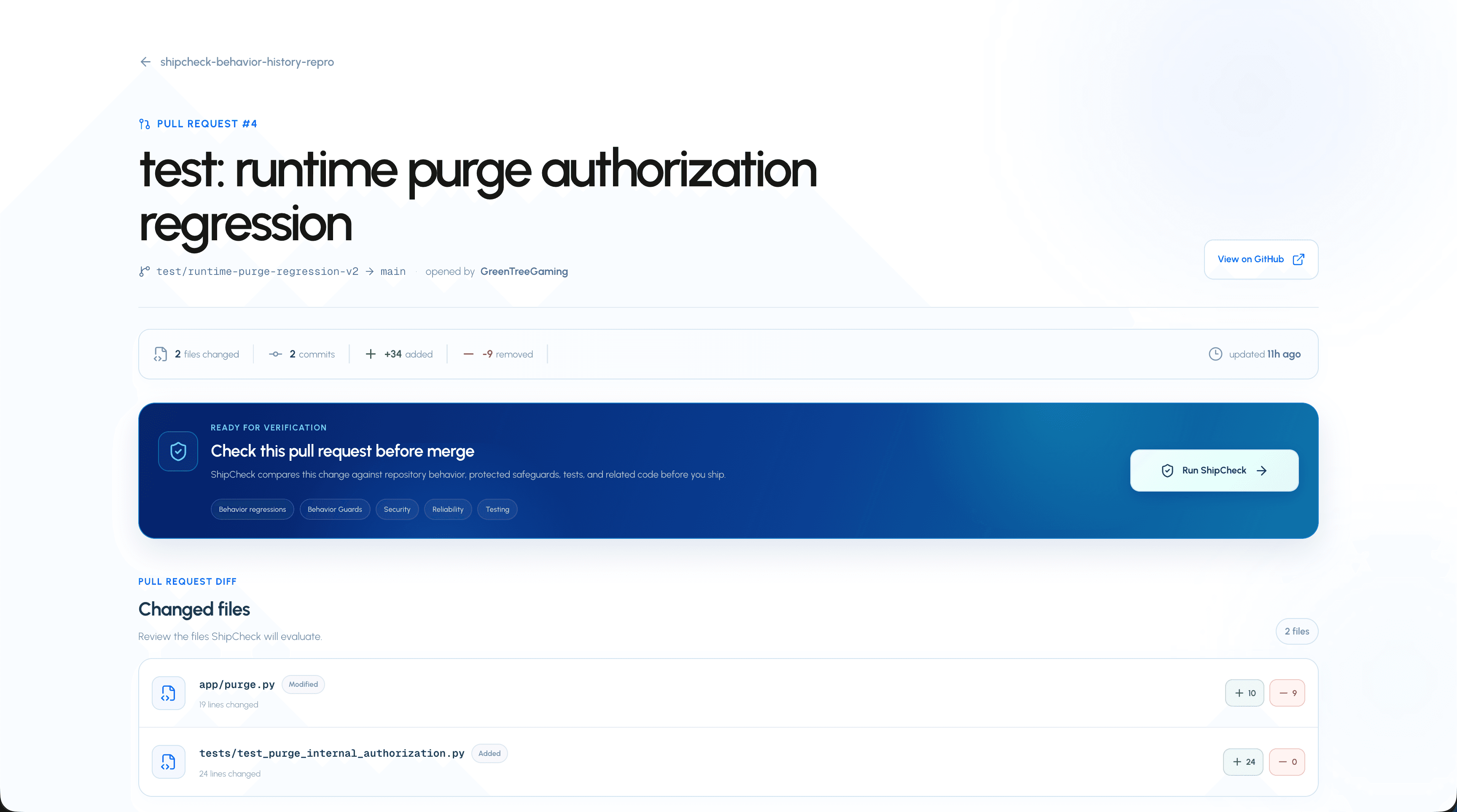
After connecting and activating a repository, you can start a pull-request scan from either the ShipCheck dashboard or directly from the GitHub pull request.
01Connect and activate the repository.
02Open one of the repository's pull requests inside ShipCheck.
03Start the ShipCheck scan.
04ShipCheck queues the analysis and displays scan progress.
05Open the completed report to review its risk-aware verdict, contract decisions, evidence, uncertainty, behavior changes, findings, and available actions.
Prefer to stay in GitHub?
On an open pull request, comment /shipcheck to request a ShipCheck scan of the current pull-request revision. ShipCheck will queue the scan and publish its GitHub result as the analysis progresses and completes.
/shipcheck
Run ShipCheck from GitHub
Trigger a ShipCheck scan by commenting /shipcheck on an open pull request.
ShipCheck can be triggered directly from a GitHub pull request. You do not need to leave the pull request and open the ShipCheck dashboard just to request another scan.
/shipcheck
01Open an active pull request in a repository connected to ShipCheck.
02Add a new pull-request comment containing /shipcheck.
03GitHub sends the comment event to the ShipCheck GitHub App.
04ShipCheck verifies that the repository is connected and that the commenter has sufficient repository permission.
05ShipCheck queues a scan for the open pull request.
06A ShipCheck GitHub comment is created and updated with the scan result.
Who can run the command?
ShipCheck only accepts the command from GitHub users with write, push, maintain, or admin permission on the repository. Read-only and triage users cannot consume scan capacity through /shipcheck.
The command must be on a pull request
The /shipcheck command is handled from pull-request comments. The same comment on a normal GitHub issue does not trigger a scan.
The command is useful after pushing new commits, when requesting an on-demand behavioral review, or whenever you want to rerun ShipCheck while remaining inside the GitHub workflow.
Pull request scanning
How a scan works
See what ShipCheck considers when analyzing a change.
ShipCheck combines deterministic checks with repository-aware reasoning. It does not analyze a pull-request diff as an isolated block of text.
Changed files and pull-request diffs.
Relevant surrounding implementation.
Authentication and authorization boundaries.
Validation logic.
Callers and related helpers.
Existing tests.
Error handling.
State transitions.
Data semantics.
Repository-specific safeguards.
Protected Behavior Guards.
Behavior Contract versions and evidence requirements.
Differential base-versus-head runtime results.
Mapped downstream repositories and consumer relationships.
Production Sentinel incidents and approved incident regression scenarios.
Relevant Git history.
This additional repository context helps ShipCheck distinguish meaningful behavior changes from ordinary implementation changes.
Scan progress
Track an analysis while ShipCheck processes the pull request.
ShipCheck processes scans asynchronously and reports progress while analysis is running. While processing, the scan progress page reports the state of the analysis instead of requiring the browser request to remain open for the entire scan.
When processing completes, ShipCheck redirects you toward the completed report where the full analysis can be inspected.
Risk-aware ship verdict
Understand how findings and Behavior Contracts govern the final ship decision.
A completed scan combines conventional findings with the verification result, criticality, enforcement, lifecycle, and approval state of every affected Behavior Contract. The numeric score remains useful context, but the verdict is no longer derived from score alone.
A completed scan combines the overall verdict with the evidence and behavioral changes behind it.
Ready to ship
No blocking findings or enforced contract concerns remain.
Ready with uncertainty
A non-blocking contract remains inconclusive and its uncertainty is shown explicitly.
Review before shipping
A warning, pending contract decision, or high-risk inconclusive result requires human review.
Do not ship
A critical finding or enforced contract violation should block the change.
The report shows the policy version, contract decisions, evidence, citations, contradictions, and remaining uncertainty behind the verdict. The verdict is still a review signal rather than a substitute for engineering judgment.
Finding severity
Understand how ShipCheck communicates the importance of a finding.
Critical
A high-impact issue that may make the pull request unsafe to ship.
Warning
A meaningful concern that deserves review.
Info
Useful analysis that does not necessarily represent a blocking problem.
Passed
A check or protected condition was successfully preserved.
Finding categories
The affected-area categories used throughout repository settings and scan reports.
Category
What it covers
Security
Authorization, authentication, secrets, unsafe boundaries, and security-sensitive behavior.
Reliability
Failure paths, null assumptions, cleanup, normalization, and runtime reliability.
Quality
Contracts, implementation assumptions, incomplete changes, callers, and maintainability-related correctness.
Accessibility
Accessible names, semantics, labels, keyboard behavior, and user interaction accessibility.
Testing
Coverage for changed behavior, important failure paths, edge cases, and regression protection.
Other
Findings that do not cleanly belong to one of the repository-configurable categories.
Behavior change categories
The behavior-specific taxonomy used when ShipCheck detects an actual behavioral transition.
Affected-area categories and behavior-change categories are intentionally separate. The first says what area of the software is involved; the second says what kind of behavior changed.
Behavior category
Meaning
Removed safeguard
A previously existing defensive check or safeguard disappeared.
Changed authorization
Who is allowed to perform an action changed.
Changed validation
Accepted or rejected inputs changed.
Changed API contract
An API, caller, helper, or integration contract changed.
Changed state transition
The conditions or result of a state transition changed.
Changed error behavior
Errors are raised, returned, handled, or suppressed differently.
Changed data semantics
The meaning, normalization, storage, or interpretation of data changed.
Changed user behavior
User-visible functionality or interaction behavior changed.
Other
A meaningful behavior change outside the predefined categories.
Behavioral memory
Behavior Discovery
Discover important expectations already encoded in a repository.
Behavior Discovery identifies meaningful rules that already exist inside the repository without requiring developers to manually document everything first.
Authorization guarantees.
Validation rules.
Business rules.
Error-handling expectations.
Data semantics.
Existing safeguards.
User-facing behavioral expectations.
Discovered behaviors appear as candidates. A developer can protect a useful candidate or dismiss one that should not become persistent repository memory.
Behavior Guards
Protect an expected repository behavior across future code changes.
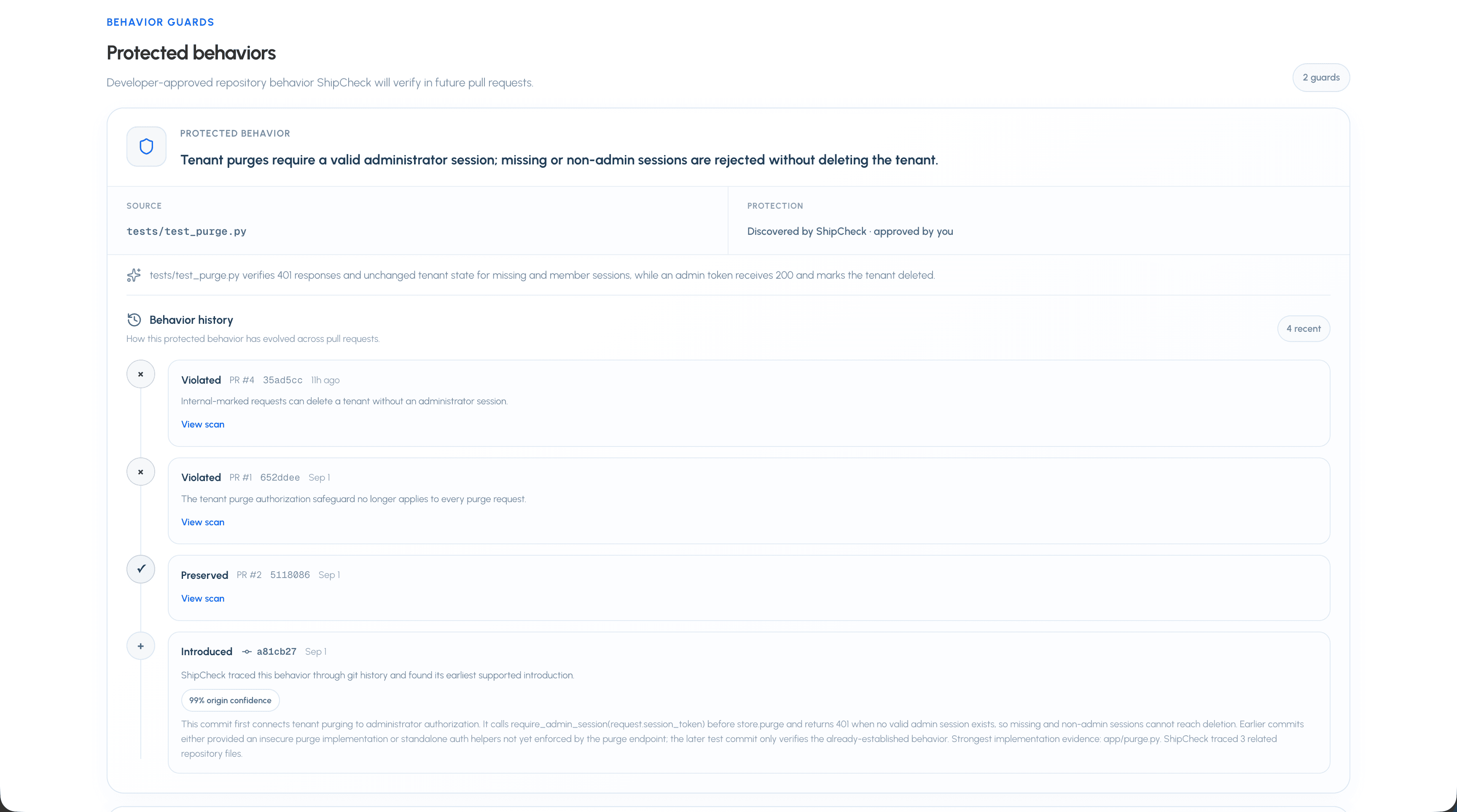
A Behavior Guard is a persistent expectation about what the repository is supposed to keep doing.
Only administrators may delete a tenant.

Expired sessions must always be rejected.

Course codes are normalized before duplicate detection.
Protected behaviors become persistent expectations that ShipCheck can verify against future changes.
Once protected, future pull requests can be evaluated against the behavior and its supporting evidence rather than relying on each reviewer to rediscover the rule from scratch.
Govern a protected behavior as a versioned, auditable software contract.
A Behavior Guard identifies what the repository must preserve. Behavior Contracts V2 adds the governance needed to decide how strongly that expectation should affect verification and the final ship decision.
Lifecycle: proposed, active, changing, deprecated, or retired.
Criticality: advisory, important, critical, or regulated.
Enforcement: observe, warn, require review, or block merge.
Owner and approval state.
Structured preconditions, invariants, scenarios, and observables.
Required runtime, test, static, historical, or manual evidence.
Saving a governance or claim change creates an immutable contract snapshot with its change reason. Verification runs also retain the exact contract version used for that commit.
Behavior Verification Agent
See how ShipCheck plans, investigates, and evaluates protected behavior.
The Behavior Impact Graph selects contracts connected to a pull request. Higher-criticality contracts receive priority, while deprecated and retired contracts are not scheduled for active verification.
The planner converts the contract into falsifiable invariants and scenarios.
Read-only tools can retrieve files, look up references, discover tests, and inspect historical evidence.
A strict call budget bounds the investigation.
Runtime, code-presence, test-presence, and investigation results are normalized into evidence.
Coverage, citations, source diversity, contradictions, and required evidence are evaluated by policy.
Inconclusive is a real result
Code or test presence is not automatically proof that behavior executed successfully. If decisive or contract-required evidence is unavailable, ShipCheck reports the remaining uncertainty instead of manufacturing a verified result.
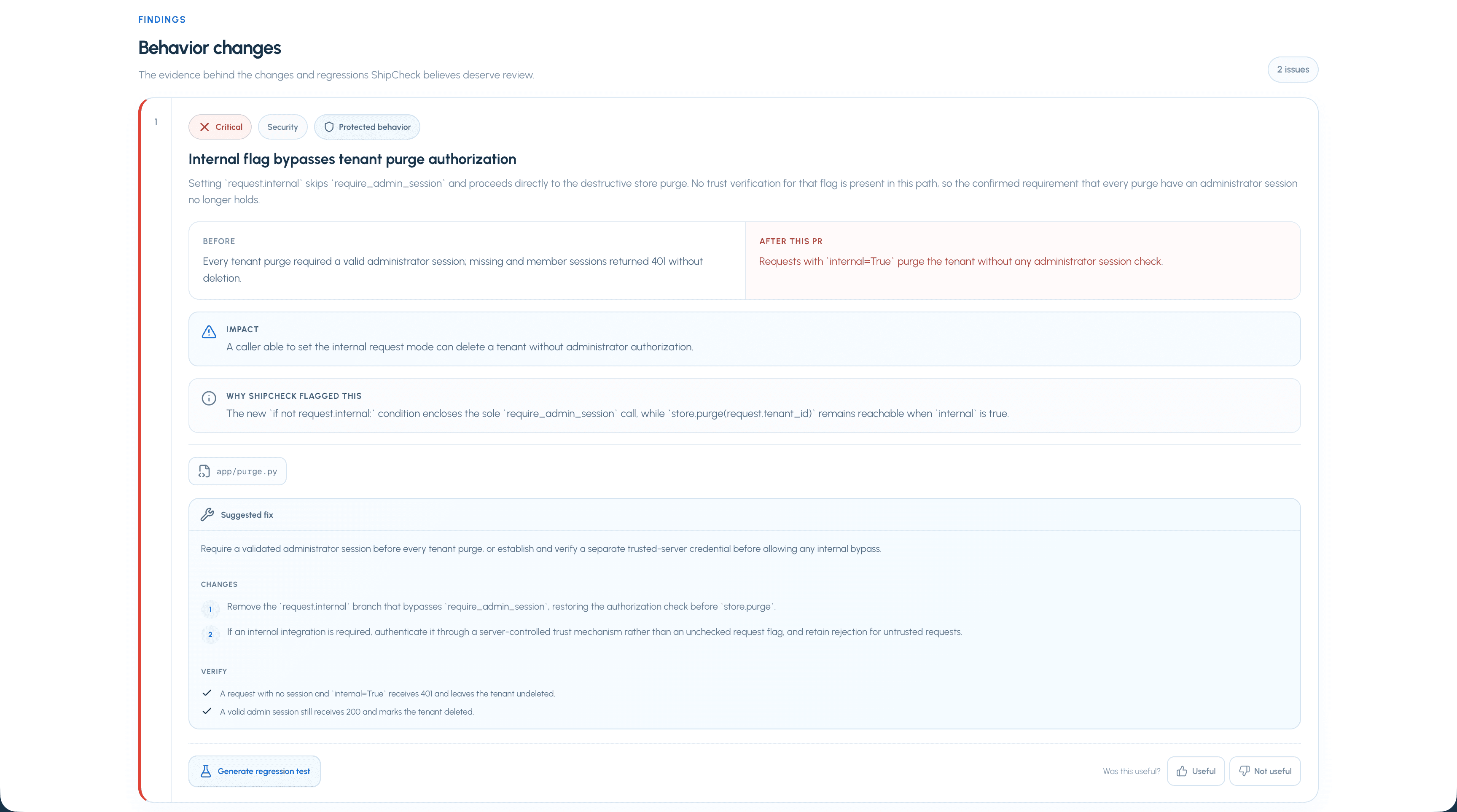
Behavioral Diff
Understand what the software does differently after a pull request.
A source-code diff describes which lines changed. Behavioral Diff describes what those changes mean for the software.
BEFORE

Only project owners can update a project.

AFTER

Any authenticated user can update the project.

RESULT

Authorization behavior changed.
Preserved
A known behavior still works after the pull request.
Changed
A known behavior is different after the pull request.
Violated
A protected expectation no longer holds.
New
The pull request introduces meaningful behavior that was not previously present.
Intentional behavior changes
Teach ShipCheck when changed behavior is deliberate rather than a regression.
Not every behavior change is a bug. Product requirements change, old restrictions are intentionally removed, and APIs evolve.
ShipCheck distinguishes likely unintentional changes, unclear changes, and likely intentional changes. Developers can explicitly mark supported behavior changes as intentional.
Repository memory evolves
An intentional change can update the expected behavior instead of leaving the repository permanently anchored to an outdated rule.
Behavior History
Track how protected repository behavior evolves across commits and pull requests.
Behavior History gives important software expectations their own timeline, separate from the raw Git history of files.
Git remembers how source code changed. Behavior History is designed to remember how expected software behavior changed.
Historical origin tracing
Trace protected behavior back to the Git history that established it.
ShipCheck can inspect Git history to determine where a protected behavior appears to have first become true.
Source commit.
Historical date.
Relevant implementation file.
Related implementation and test evidence.
Cross-file origin evidence.
Confidence score.
Explanation of why the commit established the behavior.
Origin tracing is not limited to the exact file where a Behavior Guard was discovered. ShipCheck can inspect related helpers, authorization logic, tests, and implementation history.
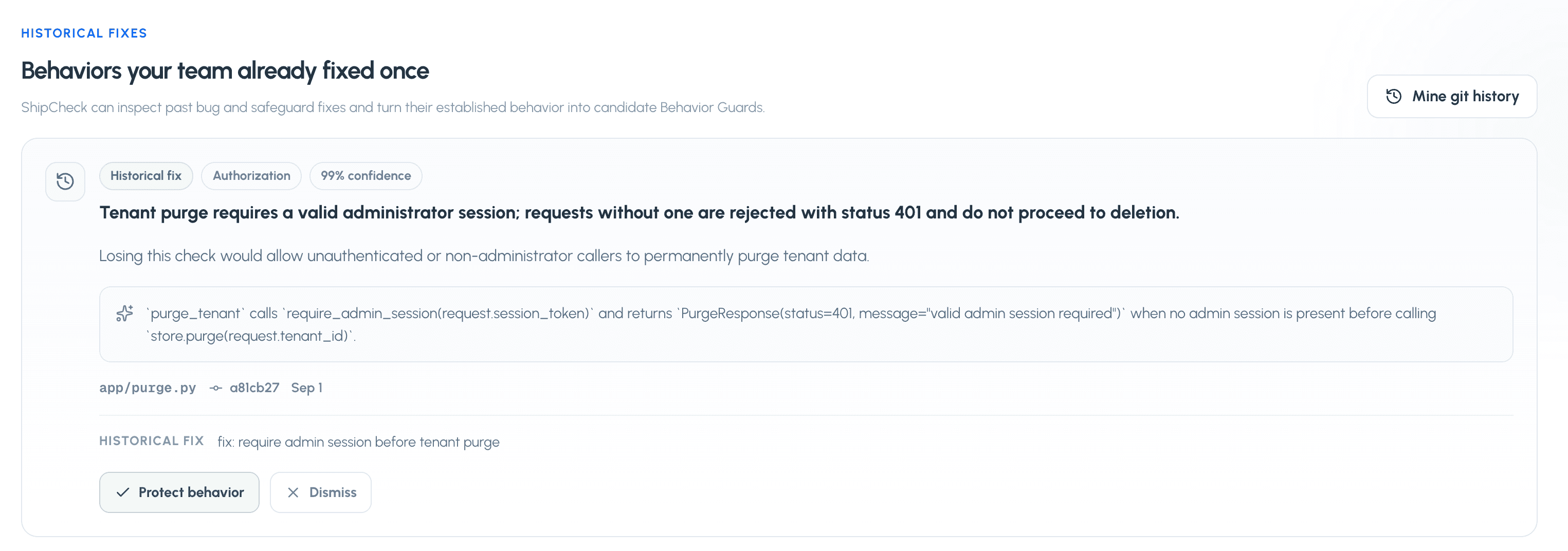
Mine historical fixes
Turn important past bug fixes into candidate Behavior Guards.
Some of the strongest evidence for what a repository must preserve is hidden inside bugs the team already fixed.
ShipCheck can mine repository history for these types of fixes and convert supported fixes into candidate behaviors.
Historical fixes surface behaviors established by previous bug and safeguard fixes so they can become Behavior Guards.
01Open a repository in ShipCheck.
02Find the Historical fixes section.
03Choose Mine git history.
04Review the candidate behavior, evidence, source commit, and confidence.
05Protect the candidate if it represents behavior the repository should continue preserving.
06Dismiss candidates that should not become repository memory.
Verification & governance
Differential Verification Lab
Execute the same protected scenario against base and head to identify regressions introduced by a change.
For eligible runtime Behavior Guards, ShipCheck runs the same scenario against the pull request's base commit and head commit. Comparing both executions gives the verdict direct evidence about what the change introduced.
Preserved
The scenario passed on both base and head.
Regression
The scenario passed on base and failed on head.
Pre-existing failure
The scenario failed on both base and head.
Improved
The scenario failed on base and passed on head.
Inconclusive
One or both revisions could not produce decisive runtime evidence.
Same scenario, two revisions
ShipCheck retains both commit SHAs, execution results, output, duration, and the resulting transition so a regression claim can be traced to the paired run.
GitHub merge gates and exceptions
Turn a risk-aware verdict into an enforceable GitHub check without losing the underlying evidence.
After a pull-request scan completes, ShipCheck evaluates the repository's merge policy and publishes a GitHub check. Ready verdicts pass, uncertainty can remain visible as a warning, and review-required or do-not-ship verdicts can prevent merge.
Choose whether Review before shipping blocks the check.
Require write, maintain, or admin GitHub permission to approve an exception.
Limit how long an exception remains active.
Choose whether regulated Behavior Contracts may ever be waived.
Retain policy, verdict, actor, reason, expiry, and revocation as audit evidence.
Exceptions do not rewrite the verdict
An approved exception changes the merge-governance decision for a limited time. The underlying risk-aware verdict and its reasons remain intact.
Team Workspaces
Share repositories, contracts, policies, verification reports, and decisions with role-based access.
A Team Workspace gives an engineering group a shared view of repository behavior while connected repositories remain owned by the users who added them.
Role
Access
Owner
Full workspace administration and billing ownership.
Admin
Manage members, policies, contract ownership, and approvals.
Member
Share owned repositories and manage cross-repository dependency mappings.
Viewer
Read shared repositories, contracts, reports, and audit history.
Invite teammates through a seven-day link tied to a verified email address.
Share repositories without transferring GitHub ownership or installation access.
Assign owners to Behavior Contracts and apply organization policy templates.
Require another administrator to review pending governed contract changes.
Inspect shared scans and the latest workspace audit events.
Team billing status
Workspace-linked subscriptions, seat enforcement, and pooled allowances are implemented in the billing backend. Public Team subscription checkout is not yet available.
The Organization tab in a Team Workspace is the control plane for every shared repository. Owners and administrators save one versioned policy that ShipCheck synchronizes to active Behavior Contracts and repository merge-governance settings.
Control
Effect
Repository access
Keep workspace-wide visibility or require an explicit read, contribute, or manage grant for each member and repository.
Contract defaults
Synchronize criticality and enforcement across active Behavior Contracts in shared repositories.
Approval mode
Approve organization changes immediately or require another administrator to review affected contracts.
Merge governance
Synchronize merge checks, review blocking, exception rules, required GitHub permission, and maximum exception duration.
Deployment controls
Declare protected environments and the verification or approval decision expected by deployment integrations.
01Open a Team Workspace and choose Organization.
02Choose workspace-wide or restricted repository access.
03Set the Behavior Contract defaults and approval mode.
04Set the organization merge-governance and exception policy.
05List protected deployment environments and choose their deployment gate.
06Apply the policy and review its synchronized contract changes in Contracts and its audit records in Audit.
Restricted repository access
Owners and administrators always retain organization access. Repository owners retain access to repositories they shared. Other members only see restricted repositories when an administrator grants access from the Repositories tab.
Deployment integration boundary
The organization policy now records the deployment decision required for each protected environment. A deployment provider integration consumes that policy to stop or approve a release; saving the policy alone does not deploy code.
Cross-repository behavior graph
Carry provider contract evidence into the repositories and systems that consume it.
Inside a Team Workspace, map a provider Behavior Contract to another shared repository that consumes it. The relationship can represent an API consumer, SDK dependency, event consumer, or data contract, with an optional consumer Behavior Contract and integration note.
Preserved
The provider behavior remains compatible with its consumer.
At risk
The provider behavior changed and may affect the consumer.
Violated
The provider behavior required by the consumer was violated.
Inconclusive
The scan did not produce enough direct evidence to establish compatibility.
Every provider scan stores the downstream result. At-risk, violated, and inconclusive relationships become findings and contribute to the risk-aware ship verdict. Workspace reports show the consumer, relationship, message, and evidence behind the decision.
Incident-to-Guard learning loop
Convert escaped production regressions into versioned Behavior Contract protection.
A Production Sentinel incident is evidence that protected behavior drifted after deployment. ShipCheck can turn that evidence into a reviewable proposal containing the incident cause, its resolution, a permanent invariant, and a regression scenario tied to the Sentinel's source Behavior Guard.
01Open Production Sentinels from the affected repository.
02Find the open, acknowledged, or resolved incident and choose Capture learning.
03Review the generated cause, resolution, invariant, and regression scenario.
04Approve the proposal to add its protection to the source Behavior Contract, or dismiss it when the incident should not change repository policy.
05Use the recorded contract version to trace the new protection back to its production incident.
Draft
The learning is ready for review and has not changed the contract.
Approved
The invariant and regression scenario are stored in a new immutable Behavior Contract version.
Dismissed
The reviewed incident remains in history without changing the contract.
Approval is atomic
ShipCheck updates the guard, captures its immutable contract version, records the approver, and links the learning to that version in one database operation. If any step fails, the contract is left unchanged.
The incident remains evidence
Approving a learning does not erase or rewrite the production incident. Its status, timestamps, occurrence count, deployed revision, resolution, and Sentinel context remain attached to the learning audit trail.
Findings & repairs
Finding lifecycle
Follow a finding across repeated scans of the same pull request.
ShipCheck fingerprints findings so the same issue can be tracked between revisions instead of appearing as an unrelated new finding after every scan.
New
The finding was introduced in the current revision.
Still present
ShipCheck matched the issue to a finding from the previous completed scan.
Resolved
A previously detected finding is no longer present.
Reopened
A previously resolved issue appeared again later.
Evidence and source context
Review why ShipCheck produced a finding and where it applies.
ShipCheck findings can include the affected file, source lines, code snippets, behavioral before/after information, impact, and supporting repository evidence.
Review the evidence before acting on a finding. A finding should be treated as a reasoned engineering claim that can be inspected, not as an unexplained AI score.
Suggested and applicable fixes
Use ShipCheck to turn a concrete finding into a bounded code repair.
Eligible findings can include a suggested repair. Some repairs can be applied directly when ShipCheck has enough concrete context to construct a bounded edit plan.
Eligible findings expose actions directly beside the evidence that produced the finding.
Repairs remain tied to a specific finding.
Machine-applicable repair plans are bounded.
A repair can include multiple related edits when the account plan supports multi-file fixes.
ShipCheck limits generated repair plans to a small number of files and edits instead of allowing unrestricted repository rewrites.
Current safety bound
Machine-applicable repair plans are intentionally bounded to a small number of related files and edits.
Regression tests
Generate a focused test that protects behavior exposed by a finding.
A meaningful regression is more valuable when it produces durable protection. Eligible findings can be used to generate focused regression tests.
01Open a finding that supports regression-test generation.
02Ask ShipCheck to generate the regression test.
03Review the proposed test and the environment information ShipCheck used.
04Apply the generated test when it accurately captures the intended behavior.
This helps move the repository from detecting a bug once toward preventing the same class of regression in the future.
Mark a finding intentional
Record when a flagged change is actually the intended product change.
When ShipCheck correctly detects a behavior change but that change is intentional, it can be marked accordingly rather than being treated as an accidental regression.
This distinction is particularly important for behavioral memory because expected behavior must be allowed to evolve as the product evolves.
Finding feedback
Give feedback on individual ShipCheck findings.
Completed scan findings include feedback controls. Feedback provides a direct way to communicate whether an analysis was useful or inaccurate.
Finding feedback is separate from marking a behavior change intentional. An intentional change can still be correctly detected by ShipCheck.
Repository tools
Repository dashboard
Use the repository page as the home for pull requests, Behavior Contracts, history, and repository health.
Each connected repository has its own ShipCheck page. It brings together repository status, pull requests, protected behaviors, Behavior Contract governance, scan activity, historical fixes, and repository-specific tools.
From a protected behavior, developers can configure lifecycle, criticality, enforcement, owner, approval, structured claims, evidence freshness, and required evidence. Every saved contract change requires a reason and produces a new immutable version.
The repository dashboard is the central workspace for a connected repository.
Compare branches
Run ShipCheck analysis between repository branches without depending on a specific PR workflow.
ShipCheck includes a repository branch-comparison workflow. This is useful when you want to analyze the behavioral difference between two branches directly.
01Open the repository.
02Choose Compare branches.
03Select the base branch.
04Select the branch containing the changes.
05Start the comparison.
06Review the resulting ShipCheck analysis.
Repository settings
Control how ShipCheck analyzes an individual repository.
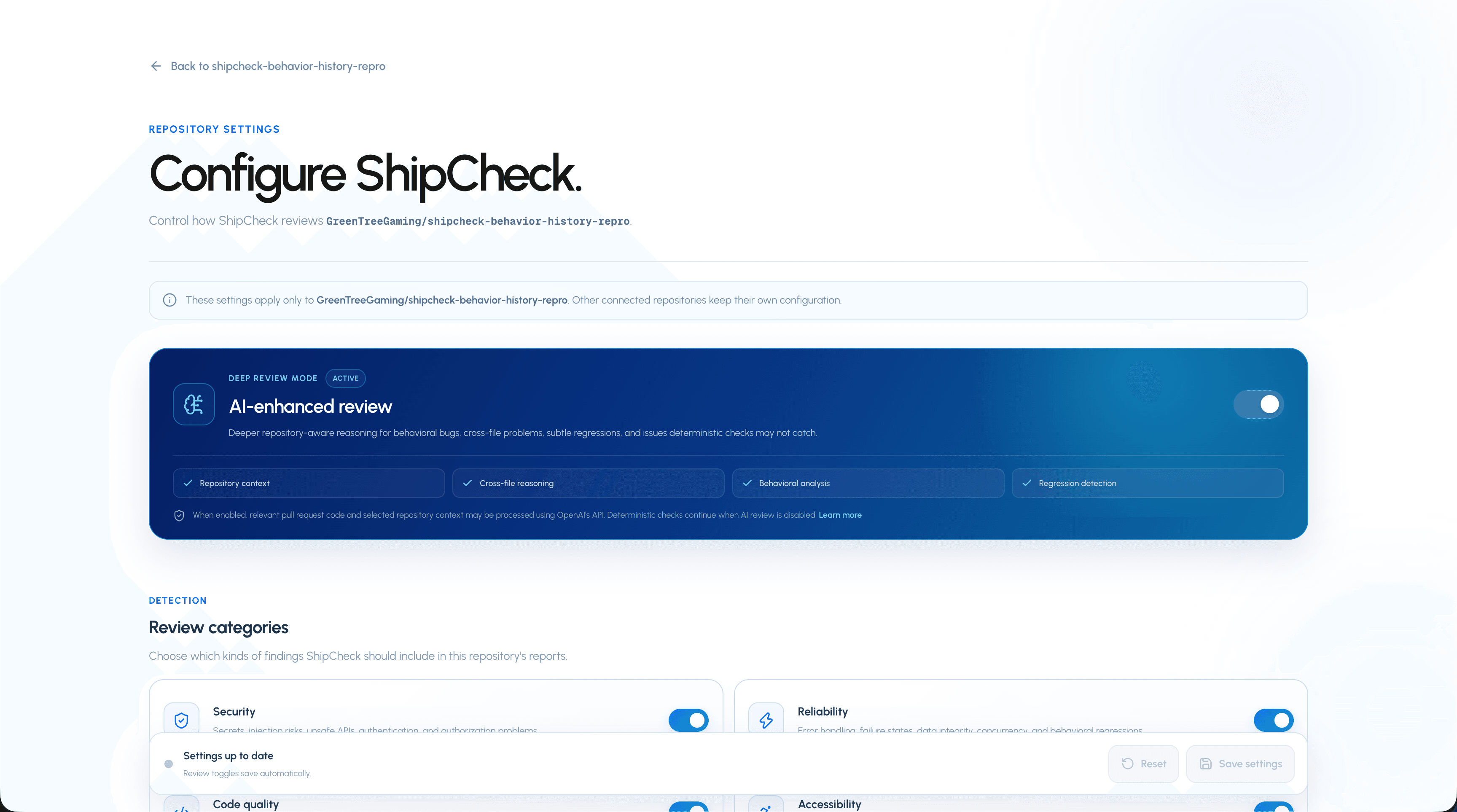
Repository settings allow ShipCheck to adapt to the conventions of individual codebases instead of applying exactly the same scanning configuration everywhere.
Repository settings control how ShipCheck analyzes an individual codebase.
Setting
Purpose
AI analysis
Enable or disable repository-aware AI analysis for this repository.
Security
Enable or disable Security findings.
Reliability
Enable or disable Reliability findings.
Quality
Enable or disable Quality findings.
Accessibility
Enable or disable Accessibility findings.
Testing
Enable or disable Testing findings.
Ignored paths
Exclude files or directories from scan findings.
Ignored rules
Disable deterministic ShipCheck rules that are not useful for the repository.
Ignored paths
Exclude generated or irrelevant repository paths from findings.
Ignored paths support simple safe glob matching. They are useful for generated files, vendored code, snapshots, documentation, or other repository-specific content that should not produce findings.
A plain directory name matches that directory and files beneath it.
ShipCheck currently stores up to 50 ignored path patterns per repository.
Ignored rules
Disable deterministic scanner rules that do not fit a repository.
A deterministic check that is useful for most repositories may not make sense everywhere. Add its rule ID to Ignored rules to suppress that rule for the selected repository.
ShipCheck currently stores up to 100 ignored rule IDs per repository.
GitHub workflow
GitHub pull-request events
Keep ShipCheck connected to pull-request activity through GitHub webhooks.
The ShipCheck GitHub App receives supported GitHub webhook events so repository and pull-request activity can flow into ShipCheck without requiring every action to begin from the dashboard.
This allows ShipCheck scanning to fit the normal pull-request workflow rather than requiring teams to maintain a separate code-review process.
Pull-request scan comments
Surface ShipCheck analysis inside GitHub.
ShipCheck can publish scan information associated with a pull request so developers can move between GitHub and the full ShipCheck report.
Generated code changes
Understand how applicable fixes and regression tests reach GitHub.
When ShipCheck applies an eligible machine-generated fix or regression test, its GitHub integration can create the required repository changes as focused commits rather than asking the user to manually copy generated code.
Generated code should still be reviewed like any other code change before merge.
Plans & usage
ShipCheck BETA limits
Current beta usage entitlements for each ShipCheck plan.
ShipCheck's product entitlements are enforced by the application. During the current beta, the Free plan receives expanded beta usage.
Plan
Repositories
AI scans
Regression tests
History
Multi-file fixes
Priority
Free · BETA
3
30
10
30 days
No
Standard
Pro
5
100
25
90 days
Yes
Faster
Max
Unlimited
500
100
365 days
Yes
Highest
Team
Unlimited
250 / seat
50 / seat
365 days
Yes
Highest
Team plan
Team entitlements scale with seats and use a minimum of three seats.
Billing management
Change, cancel, or resume a paid ShipCheck subscription.
Billing controls are available from the account settings area. ShipCheck supports starting checkout, changing a paid plan, scheduling cancellation, and resuming an eligible subscription.
01Open Settings.
02Open Billing.
03Review your current plan and usage.
04Choose the relevant plan or subscription action.
05Complete any Stripe-hosted checkout step when required.
Account & support
Account settings
Manage your ShipCheck account separately from repository settings.
Account settings are distinct from repository settings. Repository settings control scanning behavior; account settings control the ShipCheck account itself.
The account settings area also includes account-deletion controls for users who want to remove their ShipCheck account.
Send ShipCheck feedback
Send general beta feedback directly from the product.
ShipCheck includes an in-product feedback control on the public experience. During beta, feedback is especially useful for reporting confusing findings, missing behavior, workflow issues, or product suggestions.
Security information
Find ShipCheck's public security documentation.
For information about ShipCheck's own security posture and handling of repository-related access, see the dedicated Security page.